Inbound Outbound란?
네트워크간 이동경로는 두가지가 있다.
클라이언트 내부로 이동하는 : 인바운드
클라이언트 외부로 이동하는: 아웃바운드
| 구분 | Inbound Traffic | Outbound Traffic |
| 정의 | 외부 네트워크에서 내부 네트워크로 들어오는 데이터 트래픽 | 내부 네트워크에서 외부 네트워크로 나가는 데이터 트래픽 |
| 보안 목표 | 악성 코드 유입, 무단 접근, DDoS 공격 등의 외부 위협 차단 | 데이터 유출, 불필요한 트래픽 제어, 내부 위협 차단 |
| 방화벽 설정 예시 | 특정 IP 주소 또는 포트로의 접근 허용/차단 | 특정 IP 주소 또는 포트로의 접근 허용/차단 |
| 관리 도구 | iptables, nftables, 방화벽 소프트웨어 및 하드웨어 | iptables, nftables, 방화벽 소프트웨어 및 하드웨어 |
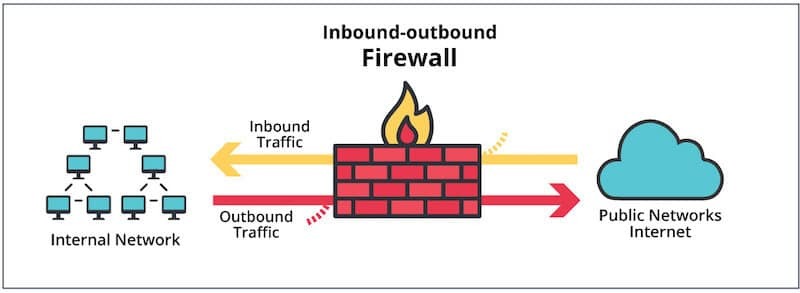
사진과 같이 방화벽을(Firewall)을 거쳐서 이동된다.
iptables란?

그렇다.
실습을하기전 네트워크 설정을 변경하는 작업이니 만큼 VM이나 WSL에서 실습하는 것을 추천한다.
규칙확인
iptables -L -n -v

Chain INPUT (policy ACCEPT 0 packets, 0 bytes)
 pkts bytes target     prot opt in     out     source               destination

Chain FORWARD (policy ACCEPT 0 packets, 0 bytes)
 pkts bytes target     prot opt in     out     source               destination

Chain OUTPUT (policy ACCEPT 0 packets, 0 bytes)
 pkts bytes target     prot opt in     out     source               destination
Chain INPUT : 현재 인바운드 트래픽을 관리한다. 현재 정책은 모두 ACCEPT
Chain FORWARD : 네트워크 인터페이스에서 다른 인터페이스로 전달하는 트래픽을 관리한다. 현재 정책은 모두 ACCEPT (중계자 역할)
Chain OUTPUT : 현재 아웃바운드 트래픽을 관리한다. 현재 정책은 모두 ACCEPT
Inbound Traffic Accept
iptables -A INPUT -p tcp --dport [PORT] -j ACCEPT

# iptables -A INPUT -p tcp --dport 80 -j ACCEPT 80포트만 허용
Inbound Traffic Drop
iptables -A INPUT -s [IP] -j DROP

# iptables -A INPUT -s 127.0.0.1 -j DROP 127.0.0.1에서 들어오는 인바운드 트래픽 차단
다시 확인해 보자
Chain INPUT (policy ACCEPT)
target     prot opt source               destination
ACCEPT     tcp  --  anywhere             anywhere             tcp dpt:http
DROP       all  --  localhost            anywhere
잘 적용이 되었다.
Outbound Traffic Accept
iptables -A OUTPUT -p tcp --dport [port] -j ACCEPT

# iptables -A OUTPUT -p tcp --dport 80 -j ACCEPT 80포트만 허용
Outbound Traffic Drop
iptables -A OUTPUT -d [IP] -j DROP

# iptables -A OUTPUT -d 192.168.0.0 -j DROP 192.168.0.0 로 나가는 아웃바운드 차단
현재 상태를 확인해보자
Chain INPUT (policy ACCEPT)
target     prot opt source               destination
ACCEPT     tcp  --  anywhere             anywhere             tcp dpt:http
DROP       all  --  localhost            anywhere

Chain FORWARD (policy ACCEPT)
target     prot opt source               destination

Chain OUTPUT (policy ACCEPT)
target     prot opt source               destination
ACCEPT     tcp  --  anywhere             anywhere             tcp dpt:http
DROP       all  --  anywhere             192.168.0.0
HTTP 웹 트래픽은 어디든지 자유롭게 이동할 수 있지만 로컬호스트(127.0.0.1)오거나 192.168.0.0으로 가는 트래픽은 차단된다.
지금은 예시일뿐 일반적으로 127.0.0.1을 차단하지는 않는다.
규칙 삭제
# inbound 규칙

iptables -D INPUT -p tcp --dport [PORT] -j ACCEPT

# iptables -D INPUT -p tcp --dport 80 -j ACCEPT

iptables -D INPUT -s [IP] -j DROP

# iptables -D INPUT -s 127.0.0.1 -j DROP

# Outbound 규칙

iptables -D OUTPUT -p tcp --dport [PORT] -j ACCEPT

# iptables -D INPUT -p tcp --dport 80 -j ACCEPT

iptables -D OUTPUT -d [IP] -j DROP

# iptables -D OUTPUT -d 192.168.0.0 -j DROP
모든 인바운드 트래픽을 기본적으로 차단하고, 특정 포트만 허용하기
iptables -P INPUT DROP
iptables -A INPUT -p tcp --dport 22 -j ACCEPT
iptables -A INPUT -p tcp --dport 80 -j ACCEPT
iptables -A INPUT -p tcp --dport 443 -j ACCEPT

# 22 , 80 , 443 만 허용하였다.
Chain INPUT (policy DROP)
target prot opt source destination
ACCEPT tcp -- anywhere anywhere tcp dpt:ssh
ACCEPT tcp -- anywhere anywhere tcp dpt:http
ACCEPT tcp -- anywhere anywhere tcp dpt:https
Iptables 설정을 저장하고 시스템 재부팅 시에도 유지되도록 설정하기
sudo iptables-save | sudo tee /etc/iptables/rules.v4

#debian Ububtu 기준